Quick question: what happens to your proposals, client follow-ups, and reporting when your AI provider decides to change the rules?
Because that’s EXACTLY what’s been happening.
Anthropic just removed an annoying limit for some Claude users. OpenAI made its assistant way easier to reach. But then Grok Bot users started reporting they were hitting their limits WAY sooner than expected. And Elon basically said it cost too much to serve them.
Fun times.
Look, I’m all for using the best AI tools available. But here’s something I want you to understand: you need to build your systems so you can switch when you need to. Because relying on ONE provider? That’s a ticking time bomb.
Let me explain.
What changed in Claude’s usage limits?
On October 30, Anthropic killed the five-hour session limit for verified Ultra users. Their old “Max 20x” plan is now called Ultra. Still $200/month. But now, verified accounts can work without hitting that SESSION cap that used to stop you cold.
You know the one. You’re deep into a project, AI’s cooking, and then… usage limit. Now you’re staring at a timer while your deadline gets closer.
That session cap is gone for verified Ultra users. (The weekly limit still exists, though.)
Eligible Ultra subscribers can also activate $200/month in API credits for building apps and agents, separate from your normal Claude and Claude Code allowance.
If you’ve been hitting the SESSION cap with weekly capacity left, this is a game-changer. You can finish projects without that particular interruption. But if you’re burning through your WEEKLY allowance, nothing changed for you. Your budget’s the same.
Why shouldn’t you build your business around one AI plan?
More importantly? This is Anthropic making their product BETTER today. Which is great. But it also proves they can change the terms whenever they want.
For now, use the extra capacity. Just keep track of which limit you’re hitting. If it’s the weekly cap, you need a backup plan for when you run out.
And don’t restructure your entire business around THIS allowance. Because what Anthropic gives today, they can take back tomorrow.
(By the way, if you need help figuring out WHICH work to give AI, check out my Find, Filter, Free walkthrough. I break down how to decide what to eliminate, what to keep human, and what to hand off.)
How is ChatGPT moving into the apps you already use?
OpenAI just made ChatGPT more accessible. On October 28, they announced texting for ChatGPT’s “dot” assistant. Eligible US Pro users are getting beta access through iMessage or RCS. The assistant remembers your preferences and can access your connected apps. It can even text you proactively with relevant updates.
The day before, they announced iCloud Mail and Calendar connections. Now ChatGPT can find emails, catch you up on your inbox, check your schedule, and update events. It’s available across all ChatGPT plans on web, desktop, and iOS.
Why does convenience matter for getting your team to use AI?
That removes one of the biggest obstacles to getting your team using AI. Most people don’t use AI as much as they could because it involves too many steps.
Find the email. Copy the context. Open ChatGPT. Paste. Ask. Copy back.
It works, but it’s friction. And friction kills adoption.
When AI lives inside the tools you’re ALREADY using, you’ll actually use it. Your team gets more value from an assistant they can reach in two seconds than from a “more powerful” tool they keep forgetting to open.
For business owners using Apple tools, this is practical:
- Ask for tomorrow’s meetings.
- Pull up relevant email threads.
- Have AI prep a brief with all the context you need.
Less searching. Less tab-switching. Less “Wait, where was that?”
What’s the risk of depending on AI integrations?
But here’s the tradeoff. The MORE your team depends on this convenience, the BIGGER the problem when OpenAI changes access, raises prices, or has an outage.
Before you connect everything, check the permissions and work out what happens if the integration breaks. If your client follow-ups depend on ChatGPT reading your calendar, and ChatGPT goes down, do you have a backup process?
Convenience is great. Dependency is dangerous.
Use the integrations, but keep your critical workflows able to run WITHOUT them.
What happened with Grok Bot’s usage limits?
Elon Musk was celebrating how fast Grok Bot was growing. Then Halloween weekend hit. Users started reporting their weekly allowances were running out WAY faster than expected.
On November 1st, Elon posted:
“The cost of serving Grok Bot was unsustainably high relative to revenue.”
Some users later said their meters were corrected. Others reported they were still getting less capacity. The exact changes weren’t clearly explained in the sources I reviewed.
If your business relies on AI to get work done, this should get your attention. Don’t build your operations around ONE model or ONE platform.
If AI handles your client follow-ups, hitting a usage cap becomes a SALES problem. If it prepares your reports, an outage becomes a DELIVERY problem.
Why should your AI harness be separate from the model?
That’s why you need the harness separate from the model.
- The harness = your instructions, knowledge base, connected tools, and quality checks.
- The model = the thing doing the work (which should be REPLACEABLE).
Keep your business playbook somewhere YOU control. Build your connections so another provider can step in if needed. And check BOTH dependencies: the model AND the platform running your systems.
Grok Bot can already use different models under the hood. But according to their docs, the PLATFORM chooses them, not you. So even with “multiple models,” you’re still dependent on that ONE platform.
How do you build an AI backup plan?
Start with one workflow you can’t afford to lose. Client follow-ups. Proposals. Weekly reporting. Whatever.
Save the instructions, source files, and examples of good outputs OUTSIDE of any single chat app. Then run the same task through a SECOND provider. Give it the tools and permissions it needs.
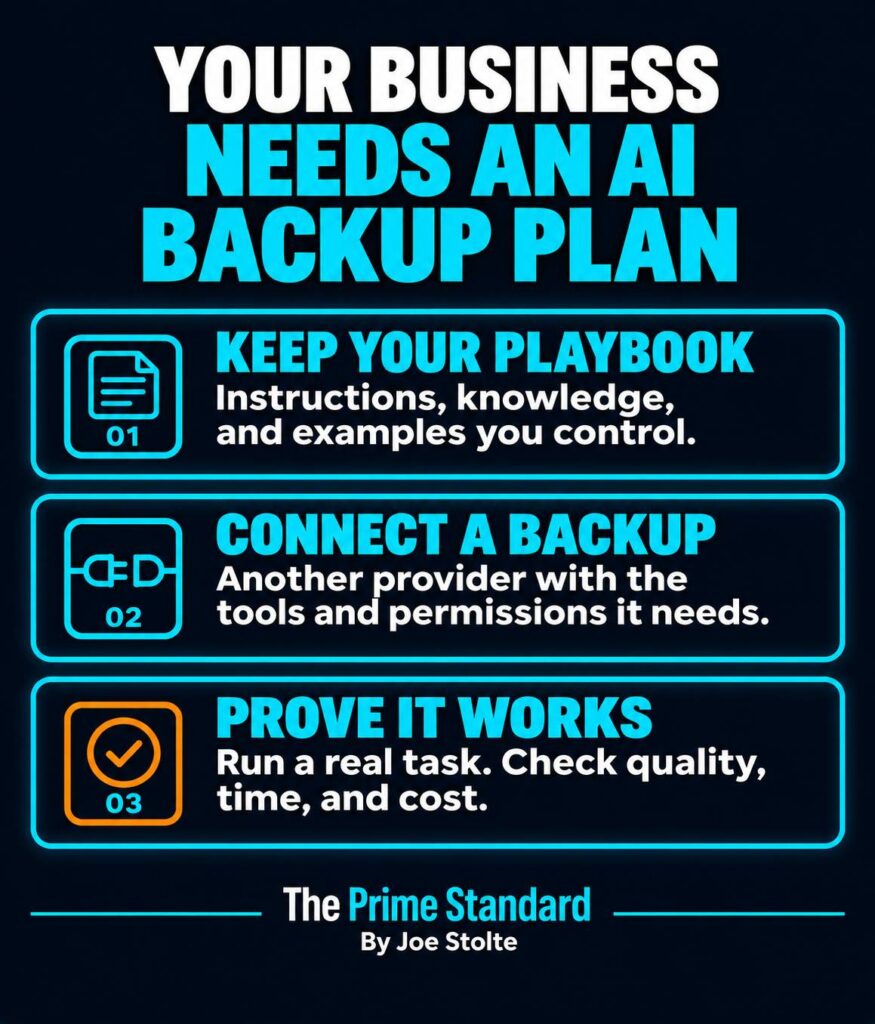
Check quality. Check how much human review time it takes. Check cost.
Having a backup login doesn’t count. You need a backup that can actually FINISH the job. And keep that backup updated as your process evolves.
Use the model that works best today. But keep enough control to switch tomorrow.
This is the way forward.
Onwards, Joe
Want help putting this to work?
- Binge my best training on using AI to grow revenue without hiring more people on YouTube.
- I’ve installed AI in 400+ businesses. This video breaks down why most people get stuck and how to actually save time and drive revenue.
- Want me to install AI agents in your business and train your team to run them? Learn more.